
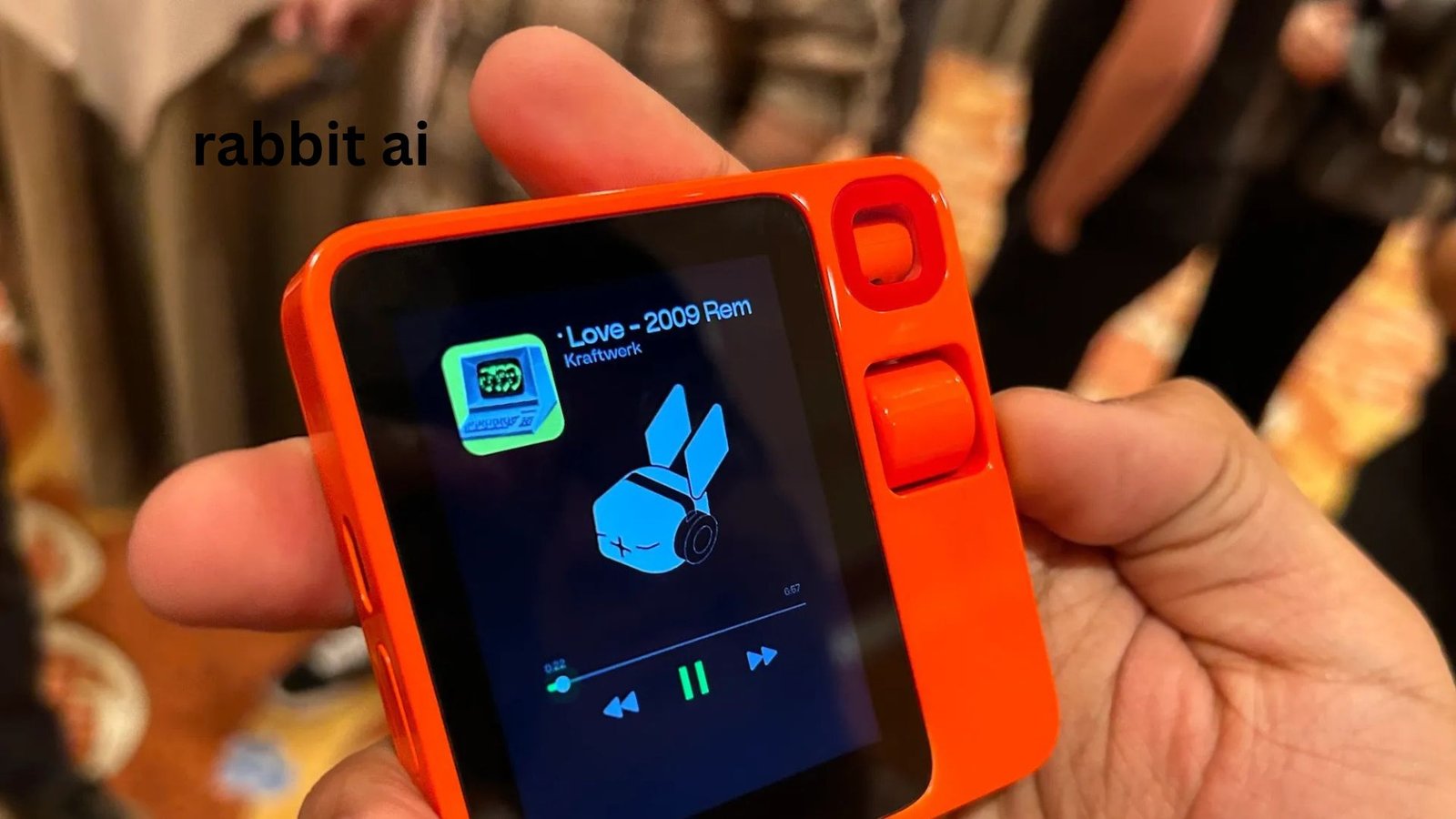
Imagine having an AI assistant that does more than answer questions. You tell it what you want, and instead of opening an app, searching through menus, and tapping buttons yourself, it attempts to carry out the task for you. That is the central idea behind rabbit AI and its pocket-sized Rabbit R1.
When the R1 launched, expectations were enormous. It promised a new way of interacting with technology through natural language, powered by Rabbit’s Large Action Model (LAM). Early reviews, however, found the product slow, unreliable, and too limited to replace a smartphone.
The interesting part is that Rabbit did not simply abandon the R1 after those criticisms. The company has continued updating the device, and the current product is substantially different from the original launch experience. RabbitOS 2 introduced a redesigned interface and AI-powered “Creations,” while later updates added computer-control capabilities such as DLAM and access to additional agents.
So, what exactly is Rabbit AI, what can the Rabbit R1 do now, and does it make sense to buy one? This guide looks beyond the launch hype and focuses on how the device fits into real everyday use.
What Is Rabbit AI?
Rabbit AI refers to the artificial-intelligence technology and products developed by Rabbit, an AI company focused on natural-language interaction and agentic computing.
Its best-known hardware product is the Rabbit R1, a small handheld AI companion designed to let users communicate with AI primarily through voice rather than conventional smartphone applications.
The original concept was straightforward:
- Tell the R1 what you want.
- Rabbit’s AI interprets your intention.
- Its software determines the necessary actions.
- The system interacts with supported services or interfaces.
- You receive the result without manually navigating every application.
Rabbit originally described its underlying technology as a Large Action Model (LAM). Unlike a conventional language model that primarily generates text, the idea behind a LAM is to understand interfaces and perform actions within them. Rabbit’s original explanation described the technology as learning how humans interact with computer interfaces and then reproducing those actions.
That distinction is important because Rabbit AI was never intended to be simply another chatbot.
What Is the Rabbit R1?
The Rabbit R1 is a compact AI device with a 2.88-inch display, physical push-to-talk button, scroll wheel, rotating 8MP camera, microphones, speaker, Wi-Fi, Bluetooth and 4G LTE connectivity. It has a MediaTek Helio P35 processor, 4GB of memory and 128GB of storage.
Rabbit currently lists the R1 at $199, with no required Rabbit subscription.
The hardware is deliberately simple. You are not supposed to treat it like a miniature smartphone.
There is no traditional app drawer where you install dozens of applications. Instead, Rabbit’s philosophy is that the AI layer should become the interface between you and digital services.
That makes the R1 particularly interesting for people who dislike navigating complicated applications.
How Does Rabbit AI Work?
The easiest way to understand Rabbit AI is to compare it with a traditional smartphone assistant.
With a conventional assistant, you might say:
“Open my music app and play this song.”
The assistant may launch the application, but you still often have to interact with the interface.
Rabbit’s original vision was different. You could express the desired outcome, such as asking it to play a particular track, and the system would attempt to perform the necessary steps.
The technology relies heavily on cloud processing. This means the R1 is not a miniature supercomputer carrying a huge AI model inside its orange casing. Much of the intelligence and processing occurs remotely.
That architecture helps explain both the strengths and weaknesses of the device.
The advantage
The hardware can remain relatively small and inexpensive while still accessing sophisticated AI capabilities.
The disadvantage
Your experience depends on:
- Internet connectivity
- Cloud response times
- Rabbit’s software
- AI accuracy
- Service compatibility
- The complexity of the task
If one part of that chain fails, the entire experience can feel unreliable.
Rabbit itself states that the R1 requires an Internet connection through Wi-Fi, 4G LTE or a smartphone hotspot. It does not support 5G.
What Can Rabbit R1 Do?
The R1 has evolved considerably since its original release.
Current Rabbit documentation highlights capabilities including AI assistance, recording and transcription, translations, camera-based searches, custom creations and agent-based computer control.
1. Ask questions
You can use the R1 as a conversational AI assistant for questions and information.
This is one of its simplest applications, although there is an important practical lesson: an AI gadget does not automatically make AI answers more accurate.
For important information, you should still verify answers rather than assuming the R1 is always correct.
Early reviewers found that the R1 could sometimes produce inaccurate responses, illustrating a problem shared by many generative-AI systems.
2. Record and summarize conversations
Recording is one of the more practical use cases.
Rabbit’s current documentation describes Magic Recorder as providing recordings, transcripts and AI summaries without requiring a separate subscription.
This could be useful for:
- Meetings
- Interviews
- Personal notes
- Brainstorming
- Lectures
- Quick voice memos
RabbitOS 2 also introduced local storage for meeting recordings, allowing recordings to work offline and providing access to summaries on the R1.
3. Use the camera for AI-powered tasks
The rotating camera allows the R1 to analyze things around you.
You can use this general capability for questions about objects, scenes or information in front of the device.
However, this is not necessarily a reason by itself to buy an R1. Modern smartphones already have excellent cameras and AI-powered visual search capabilities.
The interesting difference is the interaction model: the R1 is designed around asking rather than opening an application and manually navigating it.
4. Create custom tools with Creations
This is one of the more interesting developments after the original launch.
RabbitOS 2 introduced Creations, which allows users to describe a tool, game or experience and have the system build it directly on the R1.
For example, Rabbit’s own user guide gives examples involving a calculator, simple games and custom tools.
This changes the R1’s role somewhat.
Instead of only asking:
“What can this device do?”
you can increasingly ask:
“Can this device create something that does what I need?”
That is a much more interesting long-term direction.
Rabbit R1 and DLAM: The More Interesting New Capability
One of the biggest developments is DLAM, Rabbit’s computer-control agent.
DLAM allows the R1 to act as a controller for a Windows or Mac computer. Rabbit describes it as a general computer agent that can understand what is displayed on your screen and interact with the operating system, browser and applications.
The basic workflow is surprisingly simple:
- Update your R1.
- Connect it to your computer with USB-C.
- Use a supported Chromium-based browser.
- Share the appropriate screen.
- Give DLAM a voice or text instruction.
- Let the agent interact with the computer.
There is an important catch: current DLAM uses a bring-your-own-key (BYOK) model, requiring an API key from OpenAI or Anthropic.
The device is no longer only about controlling a handful of predefined services. It is increasingly being positioned as a physical controller for broader AI-agent workflows.
Rabbit AI vs a Smartphone
This is where prospective buyers need to be realistic.
| Feature | Rabbit R1 | Modern Smartphone |
|---|---|---|
| Voice AI | Yes | Yes |
| Camera AI | Yes | Yes |
| Internet access | Yes | Yes |
| Mobile apps | Very limited/traditional app model | Extensive |
| Cellular connectivity | 4G LTE | Usually 4G/5G |
| AI agents | Increasingly central | Increasingly available |
| Traditional multitasking | Limited | Excellent |
| Screen size | 2.88 inches | Much larger |
| Battery capacity | 1000 mAh | Usually much larger |
| Physical AI controls | Dedicated button/wheel | Mostly touchscreen |
The R1 therefore makes more sense as a specialized AI interface than as a smartphone replacement.
That distinction was already obvious in early hands-on testing. Reviewers repeatedly found themselves reaching for their phones when the R1 could not complete a task efficiently.
Three Things About Rabbit AI That Are Easy to Miss
1. The biggest innovation is the interface, not the hardware
It is tempting to focus on the orange design, rotating camera or unusual scroll wheel.
But those aren’t the important ideas.
Rabbit is experimenting with a future where the user describes an objective instead of manually operating software.
That concept could become more valuable as AI agents become better at reliably operating websites, applications and computers.
2. The R1 is more interesting as an agent controller than as a chatbot
If your only requirement is asking questions, a smartphone already does that extremely well.
The more compelling use case is asking an AI agent to perform a sequence of actions.
DLAM demonstrates this direction by using the R1 as a physical controller for a computer agent.
That makes the device’s future value less dependent on whether it can beat ChatGPT at answering questions.
3. Its greatest weakness is also its defining feature
The R1 tries to remove traditional interfaces.
But graphical interfaces exist for a reason: they give users visibility and control.
When an AI performs multiple steps automatically, you may not always know exactly what it is doing or why it made a particular decision.
For simple tasks, automation is wonderful.
For sensitive actions involving money, accounts, purchases or private information, human verification remains extremely important.
Practical Rabbit R1 Use Cases
If you already own an R1, these are the situations where experimenting with it makes the most sense.
For students
Use it for:
- Quick explanations
- Language practice
- Voice notes
- Summarizing recorded discussions
- Creating simple educational tools
For professionals
It can be useful for:
- Meeting notes
- Brainstorming
- Voice-based research
- Computer-agent experiments
- Repetitive desktop workflows
For travelers
Potentially useful functions include:
- Translation
- Location-related questions
- Quick information searches
- Voice notes
But remember that the R1 depends on connectivity, so you should not treat it as a guaranteed offline travel companion.
For developers and enthusiasts
The R1 becomes considerably more interesting if you enjoy experimenting.
Rabbit has opened the platform to developers and even provides a route for unlocking the bootloader. However, Rabbit warns that enabling developer mode and unlocking the bootloader permanently voids the device warranty.
That makes the R1 unusually appealing to technically curious users who enjoy modifying hardware.
Common Mistakes New Rabbit R1 Users Make
Expecting a phone replacement
This is probably the biggest mistake.
The R1 is not designed to give you the application ecosystem, large display and convenience of a modern smartphone.
Expecting perfect AI accuracy
AI agents can misunderstand instructions.
For important tasks, use explicit instructions and verify the result.
Giving overly complicated commands
Natural language does not mean unlimited ambiguity.
Instead of saying:
“Take care of that thing I mentioned earlier.”
give the agent the relevant context and desired outcome.
Assuming every feature works equally well
Rabbit’s software continues to evolve. The company itself describes some functions as experimental and warns users that limitations can occur.
Treat new capabilities as tools to test rather than guaranteed replacements for established software.
Ignoring privacy
The original R1 generated privacy questions because third-party services and cloud-based processing are central to its operation. Early reviewers specifically raised concerns about how connected accounts and remote service interaction worked.
Rabbit says it does not store third-party service credentials and explains that authentication occurs through destination services.
Even so, users should understand what information they are giving an AI system before connecting sensitive accounts.
Is Rabbit R1 Worth Buying?
The answer depends heavily on what you want.
Buy it for experimentation if you enjoy new AI technology, physical interfaces and agentic computing.
Consider it for productivity if features such as recording, AI summaries, Creations or computer control fit your workflow.
Do not buy it as a smartphone replacement. A modern phone remains dramatically more versatile for communication, applications, browsing, navigation and everyday digital tasks.
The context also matters because many early reviews were based on launch software. Those reviews remain useful for understanding the original weaknesses, but they should not be treated as a description of the entire current product. Rabbit has continued shipping software updates, including RabbitOS 2 and the 2026 DLAM and agent updates.
That is perhaps the fairest way to evaluate Rabbit R1 today: it began as an ambitious but unfinished AI gadget and has gradually become a broader experimental agent platform.
FAQ
What is Rabbit AI?
Rabbit AI is the artificial-intelligence platform developed by Rabbit around natural-language interaction and AI agents. Its best-known product is the Rabbit R1, a pocket-sized device designed to let users communicate with AI and perform digital tasks through voice and other controls. The platform has expanded beyond its original LAM concept with newer agentic features such as Creations and DLAM.
What is the Rabbit R1 used for?
The Rabbit R1 can be used for AI questions, voice interaction, recording and summarization, translation, camera-assisted queries and custom AI-generated experiences. Newer software also allows it to interact with computers through DLAM. Its usefulness depends heavily on connectivity, software capabilities and the particular task.
Is Rabbit R1 better than ChatGPT?
Not necessarily. ChatGPT is primarily an AI software service, while the R1 is dedicated hardware built around an AI-first interaction model. The R1’s potential advantage is hands-free physical interaction and agent-style task execution, while ChatGPT and similar services are generally more flexible across devices and applications.
Does Rabbit R1 need a subscription?
Rabbit currently lists the R1 at $199 with no Rabbit subscription required. However, particular third-party or advanced services can have their own requirements. DLAM currently uses a bring-your-own-key approach with supported OpenAI or Anthropic API keys, so users should distinguish Rabbit’s pricing from costs associated with external AI services.
Can Rabbit R1 control a computer?
Yes. Rabbit’s DLAM technology is designed to let the R1 control a computer by understanding the screen and interacting with the desktop, browser and applications. Current setup requires a compatible Chromium-based browser, screen sharing and a USB connection to the R1. DLAM also requires an OpenAI or Anthropic API key under its current BYOK model.
Is Rabbit R1 still relevant in 2026?
It is more relevant as an experimental AI-agent device than it was at launch. Rabbit has continued developing RabbitOS, introduced Creations, added DLAM and expanded agent capabilities, with RabbitOS 2.3 arriving in July 2026. Whether that makes it worthwhile depends on whether you value experimenting with AI agents more than having the mature convenience of a smartphone.
Conclusion
Rabbit AI is best understood as an experiment in changing how humans interact with computers. The Rabbit R1’s original promise was ambitious: instead of navigating dozens of applications, simply tell an AI what you want and let it handle the work.
The first version struggled to deliver that vision consistently, and early reviewers were right to criticize its reliability, latency and limited integrations.
But judging the R1 only by its 2024 launch would miss an important part of the story. Rabbit has substantially redesigned the software, added custom AI creations and introduced computer-control and agent capabilities.
The most useful perspective is therefore not “Can Rabbit R1 replace my phone?” It cannot.
A better question is: “Can a dedicated AI interface make certain computer tasks simpler for me?”
For curious early adopters, developers and people interested in the future of AI agents, that question makes the Rabbit R1 much more interesting.